
Run magpie on a server
One model gateway, with failover, for every agent on every machine.
Shelley handles the setup. About 10 minutes.
Prefer a terminal?
curl -fsSL https://exe-staging.dev/deploy/magpie/prompt.txt | ssh exe.dev new --prompt=/dev/stdinmagpie is yetone's model switcher and gateway for coding agents: Claude Code on Kimi, Codex on DeepSeek, Gemini CLI on GLM. One gateway speaks the OpenAI, Anthropic and Gemini APIs, translates between them, and moves to the next model or provider when one runs out of quota or goes down. On a laptop it serves that laptop. Run it in Docker on an exe.dev VM instead and it's one gateway that's always on, for your laptop, your other VMs and CI, with one place to keep providers, routing groups and usage.
The gateway stays private: exe.dev's HTTPS proxy lets in only you, VMs you connect, and clients holding an exe.dev token, and magpie asks every one of them for its own gateway key as well. Its first provider is exe.dev's LLM integration, so it works the moment it's installed, with no API key on the VM.
Warning
magpie can also sign in to Claude, ChatGPT and other subscriptions and spread requests over several accounts. Sharing a subscription through a gateway, or pooling accounts, may break the provider's terms. This page uses API keys and exe.dev's gateway; check your providers' terms before adding anything else.
What you get#
- magpie running in Docker Compose on ports 3425 and 3430, bound to the VM's loopback and back after a reboot
- A web key in
~/magpie/.env, readable only by you, and magpie's settings on the VM's disk in~/magpie/config - exe.dev's LLM integration added to magpie as two providers, with no API key, and a routing group
group/open-modelsthat fails over from Kimi K3 to GLM-5.3 to DeepSeek V4.1 Flash - A gateway key for this VM in
~/magpie/this-vm.key, and Claude Code on the VM answering throughgroup/open-models - The web UI at
https://<vm>.exe.xyz:3430/, private to you
What's running, and where
https://my-magpie.exe.xyz:3430/
magpie's web UI, behind exe.dev login and magpie's own web key
https://my-magpie.exe.xyz:3425/
the gateway for your laptop and CI, with an exe.dev VM token and a magpie gateway key
https://magpie.int.exe.xyz/
the gateway from your other exe.dev VMs, through a VM-to-VM integration
http://127.0.0.1:3425/
the gateway for agents on the VM itself
magpie web from ghcr.io/yetone/magpie:stable, in Docker Compose
Deploy with Shelley#
Click Deploy and Shelley will set up magpie on a new VM, then check that it works. No config-file wrangling required.
Prefer a terminal?
curl -fsSL \
  https://exe-staging.dev/deploy/magpie/prompt.txt \
  | ssh exe.dev new --prompt=/dev/stdin
What Shelley is told
Set up magpie on this VM by following the exe.dev recipe at https://exe-staging.dev/deploy/magpie.md from top to bottom.

The recipe's example VM name is my-magpie. This VM's name is the output of `hostname`: use it wherever the recipe writes my-magpie. Skip the step that creates the VM; you are on it.

You are done when all of these are true. Check each one yourself:
- magpie running in Docker Compose on ports 3425 and 3430, bound to the VM's loopback and back after a reboot
- A web key in `~/magpie/.env`, readable only by you, and magpie's settings on the VM's disk in `~/magpie/config`
- exe.dev's LLM integration added to magpie as two providers, with no API key, and a routing group `group/open-models` that fails over from Kimi K3 to GLM-5.3 to DeepSeek V4.1 Flash
- A gateway key for this VM in `~/magpie/this-vm.key`, and Claude Code on the VM answering through `group/open-models`
- The web UI at `https://<vm>.exe.xyz:3430/`, private to you

Run the VM-side commands in "Install by hand" only, skipping VM
creation. Never run share set-public or share port, never publish 3425
or 3430 beyond 127.0.0.1, and never sign magpie in to a subscription
(`magpie accounts add`, Claude, ChatGPT and the like). Verify that
`docker compose ps` shows the container healthy, that
`curl -s -o /dev/null -w '%{http_code}' http://127.0.0.1:3425/v1/models`
prints 401, and that the Claude Code check prints OK. Never print the
gateway key in your messages. Finish by giving the owner the web UI
link from "Open the web UI" with this VM's name and its ?k= key (this
conversation is private to them), and point them to "Use it from your
laptop" and "Use it from your other VMs", which they set up on their
own computer.

Finish with the URLs I should open.
Also at /deploy/magpie/prompt.txt. The recipe it follows is /deploy/magpie.md.
Install#
Deploy starts magpie, connects it to exe.dev's models, and checks that Claude Code answers through it. To do it yourself:
Install by hand
On your computer, create a VM and connect. Pick any free name:
ssh exe.dev new --name=my-magpie
ssh my-magpie.exe.xyz
Start magpie#
On the VM, make Docker start on boot, then make a folder for magpie's
settings that the container's user (uid 65532) can write. The web key and
the gateway's address go in .env, readable only by you:
sudo systemctl enable --now docker.service
mkdir -p ~/magpie/config && cd ~/magpie
sudo chown 65532:65532 config
install -m 600 /dev/null .env
cat > .env <<EOF
MAGPIE_WEB_KEY=$(openssl rand -hex 16)
MAGPIE_PUBLIC_URL=https://$(hostname).exe.xyz:3425
EOF
Both ports listen on the VM's loopback only. exe.dev's proxy still reaches them, and nothing else can:
cat > compose.yaml <<'EOF'
services:
  magpie:
    image: ghcr.io/yetone/magpie:stable
    restart: unless-stopped
    ports:
      - "127.0.0.1:3425:3425"   # the gateway
      - "127.0.0.1:3430:3430"   # the web UI
    env_file: .env
    volumes:
      - ./config:/config
    command: [web, --addr, 0.0.0.0:3430, --no-open]
EOF
docker compose up -d
sleep 10
docker compose ps
The container shows as healthy. stable is magpie's weekly channel,
which suits a server: magpie releases several times a day, and latest
follows every release.
Add a magpie command#
magpie's CLI is in the container. A small wrapper runs it from the VM's
shell, and from your computer over ssh:
sudo tee /usr/local/bin/magpie >/dev/null <<'EOF'
#!/bin/sh
# magpie's CLI, run in its container
if [ -t 0 ]; then t=; else t=-T; fi
exec docker compose -f "$HOME/magpie/compose.yaml" exec $t magpie magpie "$@"
EOF
sudo chmod +x /usr/local/bin/magpie
magpie --version
It prints magpie's version, such as magpie v0.1.3078.
Connect exe.dev's models#
Add exe.dev's LLM integration as two providers: one for Claude over the Anthropic API, one for everything else over the OpenAI API. The key is a placeholder; exe.dev adds the real credentials outside the VM:
magpie provider add exe-claude anthropic=https://llm.int.exe.xyz key=exe-gateway \
  models=claude-opus-5-5,claude-sonnet-5-5,claude-haiku-5-5
magpie provider add exe url=https://llm.int.exe.xyz/v1 key=exe-gateway \
  models=gpt-6-luna,fireworks/kimi-k3,fireworks/glm-5p3,fireworks/deepseek-v4p1-flash
magpie provider test exe-claude
magpie provider test exe
Both tests print a ✓ with a model name. models= picks what agents
see; curl -s https://llm.int.exe.xyz/v1/models lists the rest.
Then make a routing group: agents ask for group/open-models, and magpie
uses Kimi K3 until it can't answer, then GLM-5.3, then DeepSeek:
magpie group add "Open models" routing=order \
  models=exe/fireworks/kimi-k3,exe/fireworks/glm-5p3,exe/fireworks/deepseek-v4p1-flash
Make a key and check#
Every caller outside the container needs a gateway key, the VM's own agents included. Make one for this VM and keep it in a file only you can read:
install -m 600 /dev/null ~/magpie/this-vm.key
magpie gateway-key add this-vm | grep -o 'sk-magpie-[A-Za-z0-9_-]*' > ~/magpie/this-vm.key
curl -s -o /dev/null -w '%{http_code}\n' http://127.0.0.1:3425/v1/models
curl -s http://127.0.0.1:3425/v1/models -H "Authorization: Bearer $(cat ~/magpie/this-vm.key)" | jq -r '.data[].id'
The first curl prints 401: no key, no answer. The second lists
group/open-models and the seven models. Now have Claude Code, which comes
with the VM, answer through the group:
ANTHROPIC_BASE_URL=http://127.0.0.1:3425 ANTHROPIC_API_KEY=$(cat ~/magpie/this-vm.key) \
  claude -p --model group/open-models "Reply with exactly: OK"
It prints OK, after a note that Claude Code doesn't know the model's
context window; that's expected for a gateway's model names.
Open the web UI#
magpie's web UI is where you add providers, make routing groups and keys, and watch every request. On your computer, print its address with its key:
ssh my-magpie.exe.xyz 'echo "https://$(hostname).exe.xyz:3430/?k=$(grep MAGPIE_WEB_KEY ~/magpie/.env | cut -d= -f2)"'
Open it and log in to exe.dev. magpie trades the key for a cookie that
lasts 400 days, so later visits need only https://my-magpie.exe.xyz:3430/.
Port 3430 is private: exe.dev's login decides who reaches it, and the web
key keeps out anyone you've shared the VM with but not given the key.
Anyone with both can see and change your providers and keys, so treat the
link like a password.
The UI is in gateway mode: Providers, Routing, Gateway (its
keys), Usage and Sessions. There's no Agents page, since the
agents run on your other machines. Send a few requests through
group/open-models and open Routing to see which member answered each
one and why.
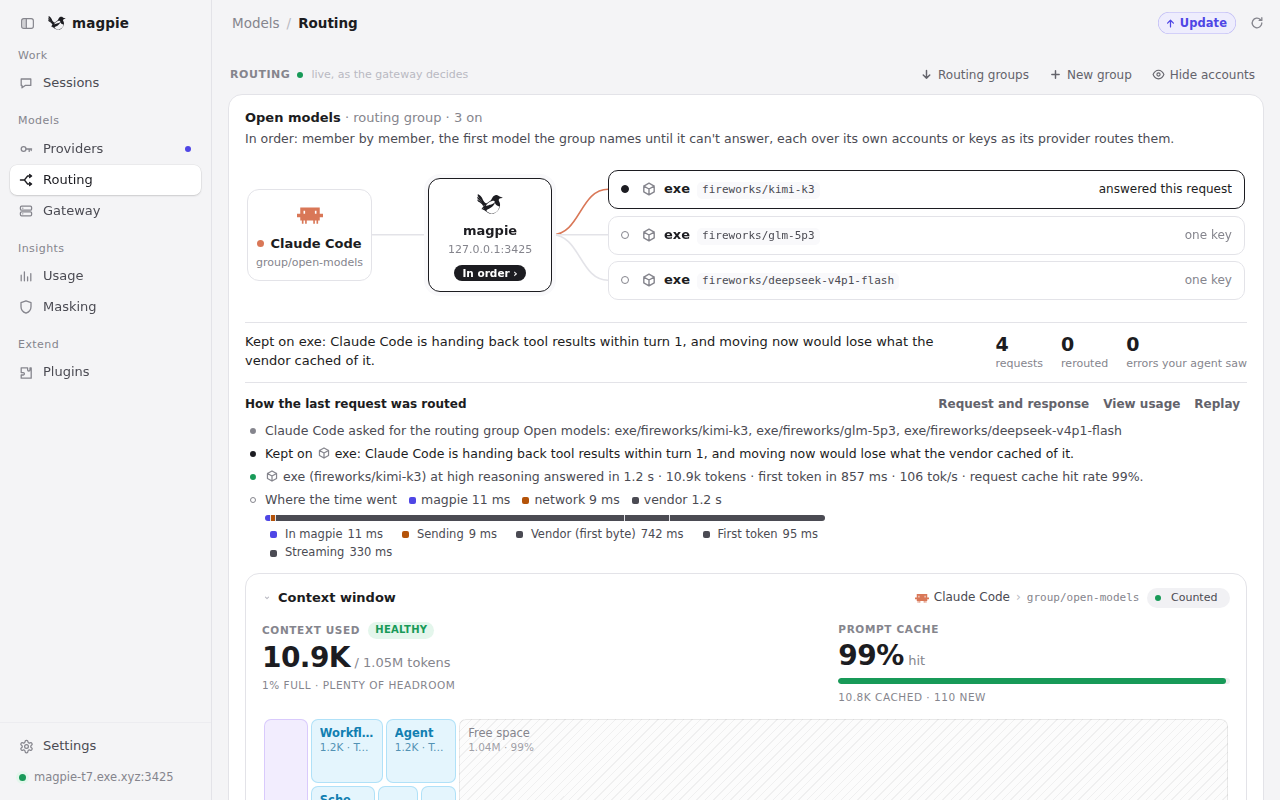
group/open-models; Kimi K3 answered, and the next two members wait their turn.Use it from this VM#
Agents on the VM call http://127.0.0.1:3425 with the key in
~/magpie/this-vm.key. For Claude Code, add to ~/.bashrc:
export ANTHROPIC_BASE_URL=http://127.0.0.1:3425
export ANTHROPIC_API_KEY=$(cat ~/magpie/this-vm.key)
Then claude --model group/open-models, or any model magpie models
lists, such as exe/fireworks/glm-5p3. Codex uses the OpenAI side,
with Claude models too:
MAGPIE_API_KEY=$(cat ~/magpie/this-vm.key) codex exec --skip-git-repo-check \
  -m exe-claude/claude-haiku-5-5 -c model_provider=magpie \
  -c 'model_providers.magpie.name="magpie"' \
  -c 'model_providers.magpie.base_url="http://127.0.0.1:3425/v1"' \
  -c 'model_providers.magpie.env_key="MAGPIE_API_KEY"' \
  -c 'model_providers.magpie.wire_api="responses"' \
  "Reply with exactly: OK"
Anything else that takes a base URL works the same way:
http://127.0.0.1:3425/v1 for an OpenAI client, http://127.0.0.1:3425
for an Anthropic or Gemini one, and a gateway key as its API key.
Use it from your laptop#
From outside exe.dev, a request needs two things: an exe.dev VM token,
which gets it through the HTTPS proxy, and a magpie gateway key, which
magpie checks. On your computer, make a token that only opens this VM
(--exp sets when it stops working):
ssh exe.dev ssh-key generate-api-key --vm=my-magpie --label=magpie-laptop --exp=90d
Then make the laptop its own gateway key, so you can limit it and turn it
off on its own. gateway-key list shows its ID:
ssh my-magpie.exe.xyz magpie gateway-key add laptop
ssh my-magpie.exe.xyz magpie gateway-key list
Optionally hold the key to a daily budget and some models (put its ID in
place of KEY_ID):
ssh my-magpie.exe.xyz magpie gateway-key limit KEY_ID day --cost 5
ssh my-magpie.exe.xyz magpie gateway-key models KEY_ID "'exe/*'" group/open-models
A request for any other model then gets a 403 that names the models the
key may use. The exe.dev token goes in the X-Exedev-Authorization header,
which exe.dev checks and strips (HTTPS tokens for VMs).
For Claude Code on your laptop:
export ANTHROPIC_BASE_URL=https://my-magpie.exe.xyz:3425
export ANTHROPIC_API_KEY=sk-magpie-key-paste-yours-here
export ANTHROPIC_CUSTOM_HEADERS="X-Exedev-Authorization: Bearer exe1.paste-yours-here"
claude --model group/open-models
For Codex, add a provider to ~/.codex/config.toml, then run
MAGPIE_API_KEY=sk-magpie-key-paste-yours-here codex -c model_provider=magpie -m group/open-models:
[model_providers.magpie]
name = "magpie"
base_url = "https://my-magpie.exe.xyz:3425/v1"
env_key = "MAGPIE_API_KEY"
wire_api = "responses"
supports_websockets = false
http_headers = { "X-Exedev-Authorization" = "Bearer exe1.paste-yours-here" }
We ran both from another machine with these settings: each answered
through group/open-models. With the token but no gateway key, magpie
answers 401; with the key but no token, exe.dev sends a login redirect.
CI jobs work the same way, with the token and a gateway key in the CI's
secrets. magpie can also hand out
short-lived keys that
expire by themselves (magpie gateway-key issue --ttl 1h --name ci), so a
job never holds a long-lived one.
Use it from your other VMs#
Your other exe.dev VMs don't need the exe.dev token: a
VM-to-VM integration adds one at the
network edge, where the calling VM can't read it. On your computer, attach
one to the VMs that should use magpie (here my-agent-vm):
ssh exe.dev integrations add http-proxy --name magpie \
  --target https://my-magpie.exe.xyz:3425/ --peer --attach vm:my-agent-vm
Make that VM a gateway key of its own, as for the laptop, then on it:
export ANTHROPIC_BASE_URL=https://magpie.int.exe.xyz
export ANTHROPIC_API_KEY=sk-magpie-key-paste-yours-here
claude --model group/open-models
magpie's Usage page counts each VM's requests under its key's name.
We ran this from a second VM: Claude Code answered through
group/open-models, and a request without a gateway key got a 401.
Add providers#
Add the providers you have API keys for in the web UI (Providers → Add
provider, then a preset and a key), or with the magpie command on the
VM:
magpie presets                       # every vendor magpie knows
magpie provider add deepseek sk-...  # a preset needs only the key
magpie group add "Daily" routing=order models=deepseek/deepseek-v4-pro,group/open-models
A group can hold other groups, so Daily uses your DeepSeek key first and
falls back to exe.dev's models when DeepSeek fails or runs out. We checked
failover with a provider that couldn't be reached: the request was answered
by the next member, and magpie's usage log marked it as answered on a retry.
A key you add to magpie is stored on the VM, in ~/magpie/config. To keep
it off the VM:
-
Anthropic, OpenAI and Fireworks: put your key in exe.dev's LLM integration ("API Key" instead of "exe.dev LLM gateway"). magpie's
exeandexe-claudeproviders then use your key, with nothing to change on the VM. -
Other vendors: put the key in an HTTP proxy integration and give magpie the integration's address with a placeholder key. For DeepSeek, on your computer:
printf '%s' "$DEEPSEEK_API_KEY" | ssh exe.dev integrations add http-proxy \
  --name deepseek --target https://api.deepseek.com --bearer=- --attach vm:my-magpie
Then on the VM, a custom provider that knows DeepSeek's models (
catalog=deepseek) but sends nothing toapi.deepseek.comitself:magpie provider add "DeepSeek" id=deepseek url=https://deepseek.int.exe.xyz/v1 \ anthropic=https://deepseek.int.exe.xyz/anthropic key=not-a-secret catalog=deepseekGive every URL this way: a preset given only
url=still sends its Anthropic and Responses requests to the vendor. We checked which addresses and headers magpie uses, but haven't run this with a real DeepSeek key.
Back up and restore#
Everything magpie keeps is in ~/magpie: providers and their keys,
gateway keys, routing groups, usage, and the web key in .env. Archive it
on the VM, and keep the archive private:
mkdir -p ~/backups
cd ~/magpie && docker compose stop
sudo tar -C ~ -czf ~/backups/magpie-$(date +%F).tar.gz magpie
sudo chown $USER: ~/backups/magpie-*.tar.gz && chmod 600 ~/backups/magpie-*.tar.gz
docker compose start
To restore one, replace 2026-11-13 with the archive's date:
cd ~/magpie && docker compose down
sudo rm -rf ~/magpie
sudo tar -C ~ -xzf ~/backups/magpie-2026-11-13.tar.gz
cd ~/magpie && docker compose up -d
Your providers, groups and gateway keys come back as they were, so clients
keep working. For a copy of the whole VM, run
ssh exe.dev cp my-magpie my-magpie-backup on your computer.
Update#
magpie in Docker is updated by pulling a new image; settings stay in
~/magpie/config:
cd ~/magpie && docker compose pull && docker compose up -d
magpie --version
The stable tag moves about once a week. For every release, change it to
latest in compose.yaml; to stay on one version, use its number
(ghcr.io/yetone/magpie:0.1.3078). See the
releases.
Troubleshooting#
401from the gateway. The request has no enabled gateway key, or sent it in the wrong place. Send it asAuthorization: Bearerorx-api-key; the web UI's cookie and the web key aren't gateway keys.- A login page or
307instead of an answer. The request reached exe.dev's proxy without a VM token. Check theX-Exedev-Authorization: Bearer exe1...header, and that the token was made with--vm=my-magpieand hasn't expired. 403for a model. That key is held to some models:magpie gateway-key listshows which, andmagpie gateway-key models <id> alllifts it.- The web UI says 401. Open it once with
?k=and the web key, as in "Open the web UI"; a new browser needs it again. - It's gone after a reboot.
systemctl is-enabled docker.serviceshould sayenabled; runsudo systemctl enable --now docker.serviceif not. permission deniedunder/configin the log. The folder isn't the container's:sudo chown -R 65532:65532 ~/magpie/config, thendocker compose restart.- A provider fails.
magpie provider test <id>sends one small request per API and prints the vendor's error.
For everything else, see magpie's Docker guide and reference, or ask on its Discord.
Frequently asked questions#
magpie or exe.dev's own LLM gateway?
Often both, as on this page. exe.dev's LLM integration is on every VM already: Claude, GPT, Grok and Fireworks' open models, with no key on the VM, but only for your exe.dev VMs. magpie adds what it doesn't do: vendors exe.dev doesn't carry (Moonshot's, Zhipu's and DeepSeek's own APIs, OpenRouter, a local Ollama), routing groups that fail over between models and providers, API translation (Claude Code on Kimi, Codex on Claude), one key per client with its own budget and models, and one usage page for all of it, reachable from your laptop and CI. If one agent on one VM is all you have, skip magpie.
Can magpie pool my Claude or ChatGPT subscriptions?
It can sign in to subscriptions and fail over between several accounts, but this page doesn't, on purpose. A subscription is usually for one person in the vendor's own apps; serving it from a shared gateway, or pooling accounts to get around limits, may break the provider's terms. Use API keys, exe.dev's gateway, or a plan the provider lets you use this way, and check your providers' terms.
Can I make the gateway public instead?
You could point the VM's public port at 3425 with share port and share set-public: we checked that magpie then refuses every request without a gateway key (401). But a leaked key is then usable from anywhere, magpie's allowed-addresses list can't help behind a proxy, and magpie's own docs say not to open the gateway to the internet. exe.dev's VM tokens and VM-to-VM integrations give you a second lock for free, so keep it private.
Can I use Tailscale instead?
Yes. Join the VM to your tailnet with the Tailscale integration, change the gateway's port line in compose.yaml to the VM's Tailscale address ("100.x.y.z:3425:3425"), and set MAGPIE_ALLOW_IPS=100.64.0.0/10 in .env. Clients then call http://100.x.y.z:3425 with a gateway key and no exe.dev token. We tested the exe.dev routes on this page, not Tailscale.
How much does it cost?
magpie is free and MIT-licensed, and uses about 30 MB of memory, so it fits on any VM in your exe.dev plan. Models through exe.dev's gateway are billed to your exe.dev account (see the models and prices); providers you add with your own keys bill you directly. magpie's Usage page shows the cost of every request by agent, model and gateway key.
Something's not working. Where do I look?
On the VM, cd ~/magpie && docker compose logs --tail 80 shows magpie's log, and the web UI's Routing page shows how each request was routed and which member answered. Troubleshooting covers the usual problems.
Updated Nov 13, 2026 · tested end to end Nov 13, 2026 · Markdown · manifest.json · Something wrong? Tell us